




Table of Contents
▼- How to Write a Graphic Designer Cover Letter
- Why Your Cover Letter Matters
- What to Include in a Graphic Designer Cover Letter
- How to Write Your Graphic Designer Cover Letter
- 1. Learn About the Company
- 2. Start with a Strong, Friendly Introduction
- 3. Share Your Design Experience Clearly
- 4. Explain Why You Want This Job
- 5. End with a Polite and Positive Closing
- 6. Keep the Design Clean and Professional
- 7. Proofread Before Sending
- Sample Graphic Designer Cover Letter
- Helpful Tips for a Great Graphic Designer Cover Letter
- Mistakes to Avoid
- Quick Checklist Before Sending
How to Write a Graphic Designer Cover Letter
If you’re applying for a graphic design job, your cover letter is your chance to show who you are not just as a designer, but as a person. It helps you explain your skills, share your story, and connect with the company before they even open your portfolio.
This guide walks you through everything step-by-step, using simple language, clear examples, and helpful tips so you can create a cover letter that feels confident, professional, and easy to read.
Why Your Cover Letter Matters
Even though your portfolio shows your talent, a cover letter helps you:
- Introduce yourself in a friendly and personal way
- Show why you’re a great match for that job
- Highlight your best design achievements
- Explain anything your résumé doesn’t cover
- Demonstrate communication skills (super important for designers!)
It’s basically your first conversation with the hiring manager so you want it to make a good impression.
What to Include in a Graphic Designer Cover Letter
Here are simple list of what to include in a Graphic Designer Cover Letter
|
Section |
What to Write |
|
Header |
Your name, contact info, portfolio link |
|
Greeting |
Address the hiring manager by name if possible |
|
Introduction |
Who you are, the role you’re applying for, and a simple hook |
|
Body Paragraphs |
Your skills, tools, experience, key projects, results, and why you like the company |
|
Closing |
Thank them, show excitement, include call-to-action |
|
Sign-off |
Simple closing + your name |
How to Write Your Graphic Designer Cover Letter
Here is the step-by-step guide on how to Write Your Graphic Designer Cover Letter
1. Learn About the Company
Visit their website, social media, or recent projects.
- Their design style
- Their brand voice
- The type of work they create
- Any recent campaigns or updates
This helps you write a letter that feels personal not generic.
2. Start with a Strong, Friendly Introduction
Skip dull lines like “I am writing to apply…”
Instead, try something like:
- What you admire about the company
- A quick win from your design experience
- Something unique about your design style
3. Share Your Design Experience Clearly
Use simple language. Focus on:
- What kind of design work have you done (branding, digital, print, motion, etc.)
- Tools you use (Adobe Suite, Figma, Canva, etc.)
- A project you’re proud of
- The results you achieved
Showing numbers helps (example: “helped increase engagement by 20%”).
4. Explain Why You Want This Job
Companies want designers who fit their style and culture.
- What inspires you about their work
- Why their design style matches yours
- How your skills can help their team
This shows real interest something hiring managers love.
5. End with a Polite and Positive Closing
Your final paragraph should:
- Thank them for reading
- Show excitement about the role
- Mention your portfolio link
- Offer to talk more in an interview
A simple closing like “Thank you for your time, and I look forward to the chance to discuss this role further” works well.
6. Keep the Design Clean and Professional
Since you’re a designer, your letter should look neat and visually consistent. Keep in mind:
- Use a clean layout
- Match the style of your résumé
- Keep fonts simple and easy to read
- Use spacing and alignment carefully
Your cover letter should support your brand not distract from it.
7. Proofread Before Sending
Check for:
- Typos
- Style mistakes
- Missing links
- Unclear sentences
- Formatting issues
Reading it out loud helps you catch awkward phrasing.
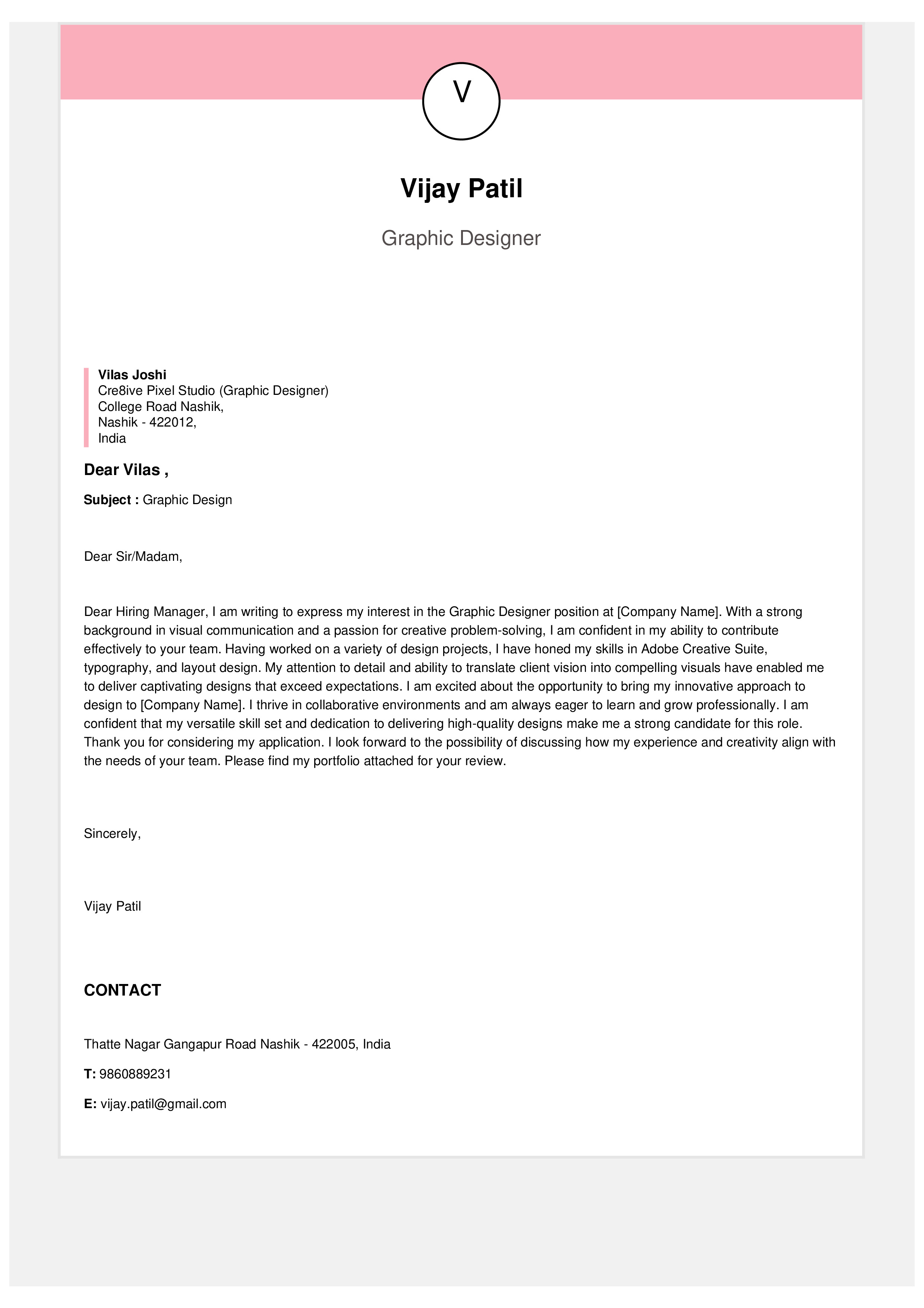
Sample Graphic Designer Cover Letter
You can copy, edit, and customize this sample:
Dear Ms. Patel,
I’m excited to apply for the Graphic Designer position at BrandX Studios. I’ve always admired your bold and modern visual style, and I would love the chance to contribute to your creative team. With four years of experience designing digital and print materials, I’ve helped brands improve their visuals and connect better with their audiences.
At CreativeCo, I led a design refresh project that included a new logo, updated website graphics, and a fresh social media look. This redesign increased engagement by 25% and improved conversions by 15%. I work confidently with Adobe Illustrator, Photoshop, InDesign, and I’m also building my skills in motion graphics.
I’m especially excited about BrandX because of your focus on storytelling through design something I enjoy and practice every day. I believe my creativity, attention to detail, and design experience would be a great match for your team.
My résumé is attached, and here is my portfolio: [link]. Thank you for your time. I would be happy to discuss how I can contribute to your team.
Sincerely,
Jane Doe
Helpful Tips for a Great Graphic Designer Cover Letter
- Keep your writing short and simple
- Sound friendly yet professional
- Focus on the value you bring
- Add a design achievement with results
- Mention tools you’re skilled at
- Always include your portfolio link
- Personalize each letter for each job
Mistakes to Avoid
- Writing one cover letter for every job
- Using long, complicated sentences
- Focusing only on responsibilities not achievements
- Forgetting your portfolio link
- Making the design too fancy or hard to read
- Starting with boring or cliché lines
Quick Checklist Before Sending
- Is the letter clear and easy to read?
- Did I personalize it for the company?
- Did I highlight one or two strong projects?
- Did I include my portfolio link?
- Did I keep it under one page?
- Did I check for typos?
